
Forward Your Grocery Order Email and See Where You Could Save
Already done your online shop? Forward your order confirmation email to Shopsplit and instantly see how your shop compares — and what to change next time.
Your confirmation email knows more than you think
You place your weekly Tesco order. The confirmation email arrives. You close it and move on.
But that email contains everything needed to run a full price comparison — every product, every quantity, every price you paid. Shopsplit reads it automatically and tells you, within few minutes, how your shop compares across every major UK supermarket.
Place your order
Shop online as normal at any supported UK supermarket
Forward the email
Forward your order confirmation email to Shopsplit
We process it
Shopsplit reads your order and notifies you when your comparison is ready
See your savings
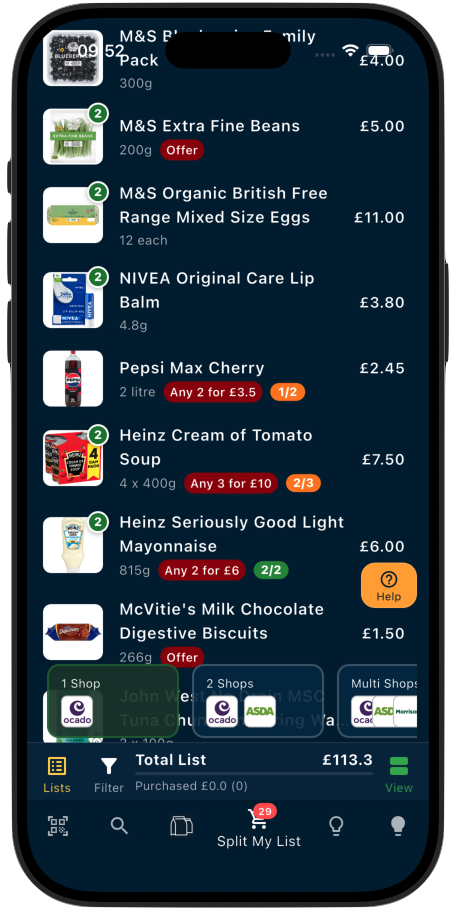
Your order appears automatically in the app as a ready-to-compare shopping list
You’ll need a free Shopsplit account to use order import. Please make sure you forward the confirmation email from your registered Shopsplit email address to import@orders.shopsplit.uk — that’s how we know it’s you. Don’t have an account yet? Create one free in the app. If we receive an email from an unrecognised address, we’ll reply with instructions on how to get set up.
What Shopsplit shows you
Once your order is imported, Shopsplit analyses every item and produces a breakdown showing:
- Which items in your order are available cheaper at another supermarket right now
- Which products have near-identical alternatives at a lower price
- What your total shop would have cost at other stores
- Whether splitting across two or more supermarkets next time would be worth it
You don’t need to type anything out. Shopsplit reads the order from your email and builds the list for you.
A note on accuracy: we work hard to recognise every product and match it correctly, but occasionally an item may not be identified with full confidence. If we match 27 out of 30 products and find meaningful savings across those — that’s still a real benefit, and better than no comparison at all. We continuously monitor and improve recognition, so it only gets better over time.
Why this is useful even after you’ve already ordered
Most price comparison tools only work before you shop. Shopsplit’s order import works after — which turns out to be just as valuable, in two different ways.
If you act quickly: most online supermarkets allow you to edit or cancel an order within a window after placing it — sometimes up to the evening before delivery. If Shopsplit processes your order fast enough, you may still have time to act on the savings right now: swap a few products at the same supermarket, remove some items and place a smaller second order elsewhere, or adjust quantities. The saving isn’t just for next time — it can be for this shop.
If the window has passed: you still get the full picture of where you overspent and why. You might discover you paid £2.40 for something that costs £1.10 at Aldi, or that three branded items you always buy have near-identical own-brand versions at half the price. Seeing exactly where the money went changes how you shop next time — small, informed swaps that add up to £400–£600 a year without any dramatic changes to how you live.
Either way, the few minutes it takes to forward an email is rarely wasted.
Which supermarkets does it work with?
Shopsplit currently supports order import from Tesco, Ocado, Morrisons and Waitrose. More supermarkets will be added over time.
Is my email data private?
Yes. Shopsplit only reads the product and price data from the specific confirmation email you forward. Your email account is never connected or accessed — you simply forward one email, the same way you’d forward anything to anyone. No inbox access, no ongoing permissions, no account linking required.
Try it on your next order


About Us
App Features
Newsletter
Resources
Savings Example
Supermarkets
Online Grocery Orders
Split Your List and Save
Cheapest Supermarket Index
Support
Contact Us
Video Tutorials
© 2026 Shopsplit Ltd. All Rights Reserved. Privacy Policy
71-75 Shelton Street, Covent Garden, London, WC2H 9JQ, UK 🇬🇧