
190,000+ UK Grocery Products.
Seven Supermarkets. One Search.
Shopsplit combines the full product catalogues from the UK’s biggest supermarkets into one searchable database — so you can find, compare, and add anything to your list without switching between apps or websites.
The Supermarkets in Our Catalogue
We pull product data and pricing from seven major UK retailers. When you search in Shopsplit, you’re searching all of them at once.
We’re continuously adding new retailers. More supermarkets will be added throughout 2026.
Tens of Thousands of Promotions — and Growing
Alongside standard pricing, Shopsplit captures active promotions across all seven supermarkets — special offers, temporary price cuts, and multibuy deals. We already track tens of thousands of promotions at any one time, and we’re continuously expanding coverage.
- Temporary price cuts and special offers
- Multibuy deals — 2 for £3, 3 for £5, and similar
- Clubcard and loyalty pricing (where applicable)
- Promotions are factored into savings calculations automatically
Not every promotion from every store is captured yet — this is an area we’re actively growing. If you spot a missing deal, it’s likely already in our pipeline.
Prices and Offers Across Every Store
Every product in the catalogue includes current pricing and any active offers from each retailer — so you can compare at a glance and spot where the better deal is.
- Current price from each supermarket
- Special offers and temporary price cuts
- Multibuy and bundle promotions (e.g. 3 for £4)
- Product details — brand, weight, pack size, unit price
- Filter by supermarket to focus on stores relevant to you
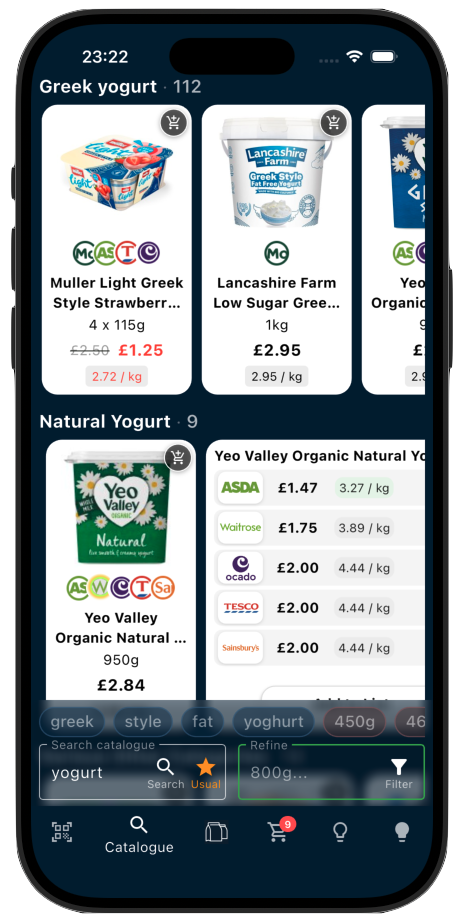
Search Wide, Then Refine
190,000 products could be overwhelming — so we built a search experience designed to narrow down quickly and intuitively. The idea is simple: start broad, then drill in using the refine bar.
The refine bar is the fastest way to navigate a large catalogue. Rather than scrolling through hundreds of results, a couple of taps gets you to exactly the right product — and the pills always update to match what’s actually in front of you.
Best experienced on iPad
The catalogue is fully functional on mobile, but really shines on tablets — a larger screen means more products visible at once, easier side-by-side browsing, and more room for the refine bar to do its thing. If you do your list-building at home, iPad is the way to go.
From Catalogue to Your Shopping List
The catalogue isn’t just for browsing — it’s the most accurate way to build your Shopsplit list. When you add a product directly from the catalogue, you’re pinning the exact item (the right weight, brand, and pack size), which means Shopsplit’s savings engine has precise data to work with.
- Tap any product to see its price across all stores
- Add to your list with one tap — no duplicates, no guessing
- Your preferences are remembered, so next time it’s even faster
- Use the barcode scanner for physical products you already have at home
You pick the product — Shopsplit picks the store
When you add something from the catalogue, you’re choosing a product, not a product at a specific supermarket. Shopsplit’s engine then recommends where to buy it based on current prices, your split preferences (one shop, two shops, or multi-store), and the overall savings across your whole list. The same tin of tomatoes might be assigned to Tesco today and Asda next week — and that’s exactly the point.
You can also build your list by forwarding a grocery order confirmation email — Shopsplit imports the items automatically. But for discovering new products or swapping something out, the catalogue is where to go.
Search the Catalogue on iPhone, iPad, or Android
Shopsplit is free to download. Start searching 190,000+ products and building a smarter shopping list today.


About Us
App Features
Newsletter
Resources
Savings Example
Supermarkets
Online Grocery Orders
Split Your List and Save
Cheapest Supermarket Index
Support
Contact Us
Video Tutorials
© 2026 Shopsplit Ltd. All Rights Reserved. Privacy Policy
71-75 Shelton Street, Covent Garden, London, WC2H 9JQ, UK 🇬🇧