Shopsplit App Features — Find Grocery Savings on iPhone & iPad

AI-powered supermarket comparison for iPhone and iPad. Compare prices, find substitutes, and split your shop across stores — here’s everything inside the app.


Download on the App Store

Free to start. No credit card required.
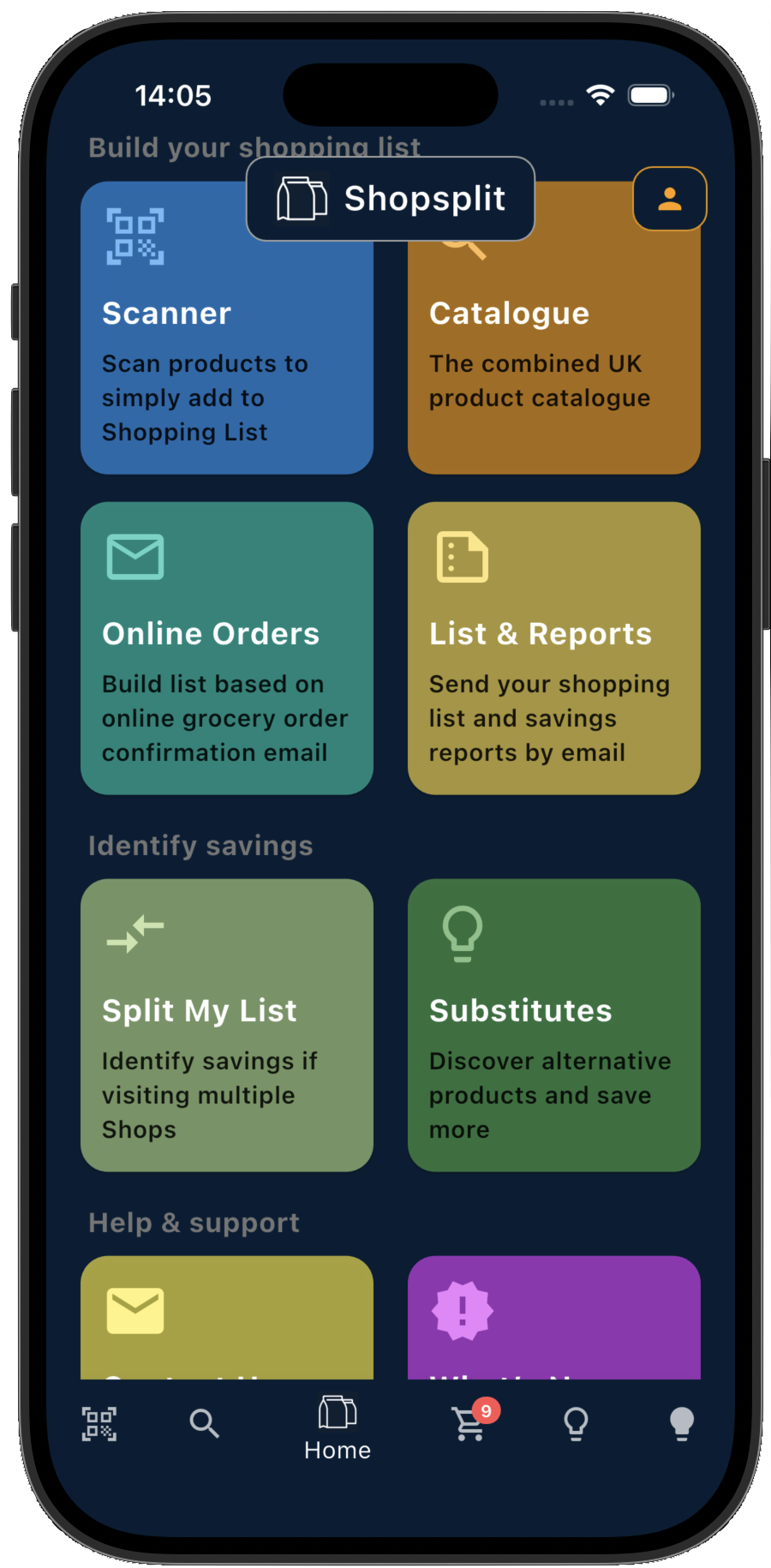
Shopsplit home screen on iPhone
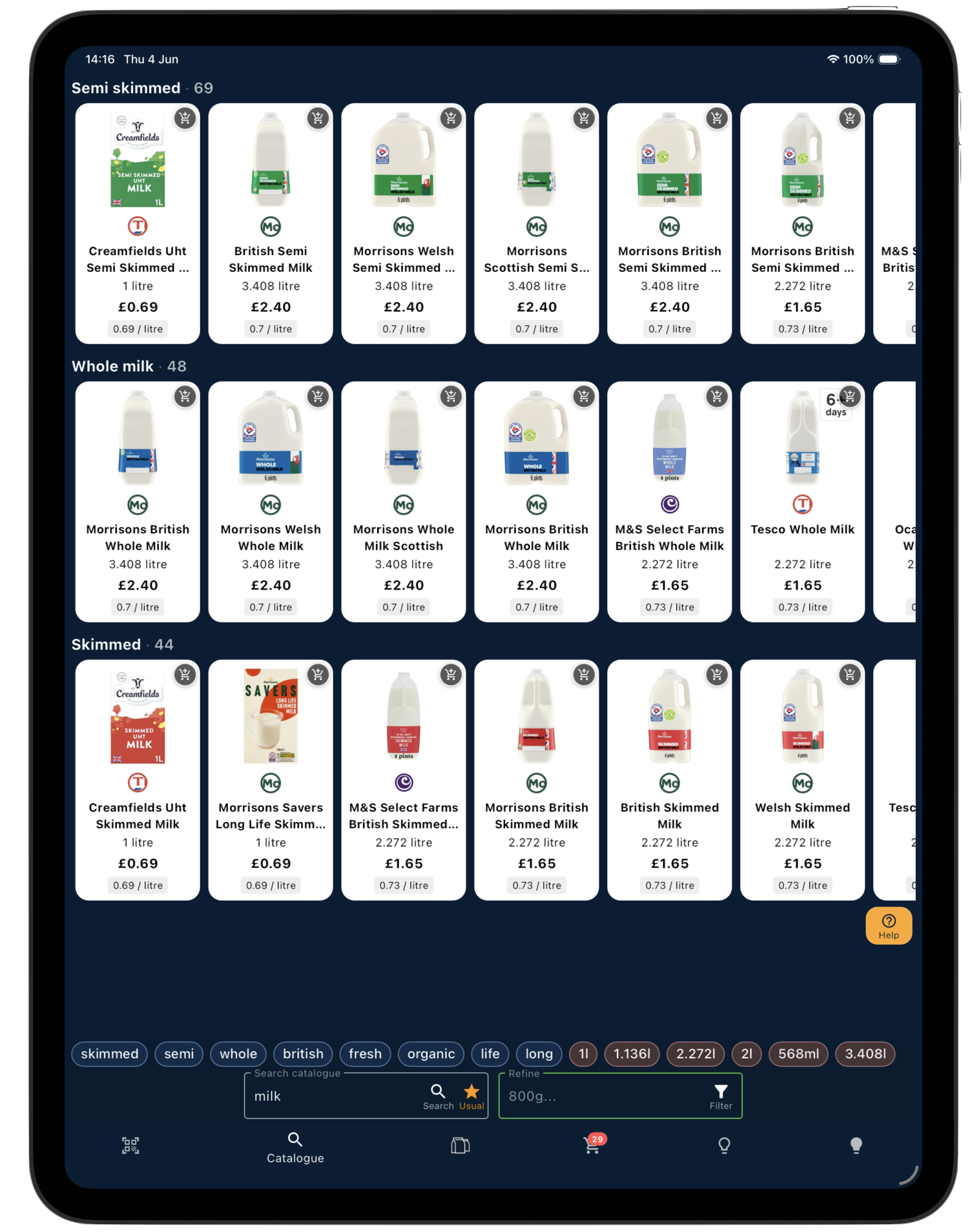
Shopsplit catalogue on iPad
Basket Splitting

Split your list across supermarkets and capture up to 95% of available savings.
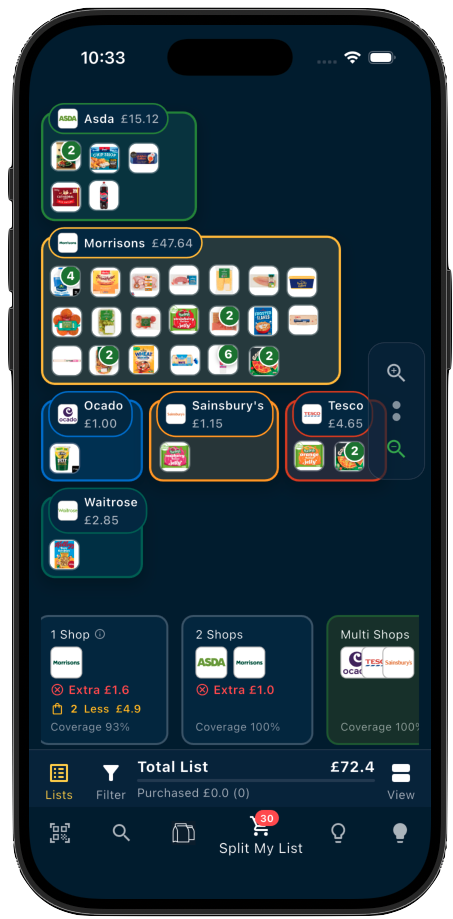
Shopsplit basket splitting across supermarkets on iPhone

Shopsplit analyses your full shopping list and recommends the most cost-effective way to split it across supermarkets. Splitting across two stores captures around 80% of available savings — adding a third pushes that to 95%.

You stay in control — and you can explore interactively. Change the number of shops, switch which supermarkets are included, and watch your products move dynamically from store to store as Shopsplit recalculates in real time. It’s easy to see exactly why each item ends up where it does.

The comparison includes current offers, multibuy promotions, and loyalty card prices — so the savings you see reflect what you’d actually pay at the till, not just the standard shelf price.

ℹ️

A note on promotions. We continuously add more offers and promotions to the platform, but we don’t yet have full coverage across every supermarket and product. The savings shown are accurate for what we have — and it gets more comprehensive all the time.

How split shopping works →
AI Savings & Substitutes

Discover cheaper alternatives and substitutions — tailored to your shopping list.
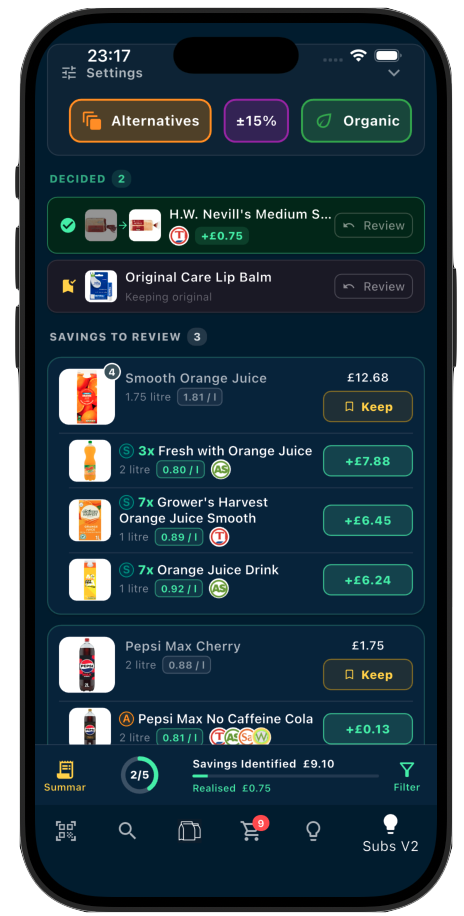
Shopsplit savings and substitutes screen on iPhone

Shopsplit doesn’t just find where the same product is cheaper — it also identifies substitute products that are comparable in quality but lower in price. In many cases, substitutes save more than store-switching alone.

Use the filters to focus on specific supermarkets — useful if you already know where you’re shopping and just want to find the best swaps within those stores.

For each suggestion you stay in control: accept the ones you’re happy with, keep the originals where you’re not. Once you’ve decided, Shopsplit updates your shopping list automatically with all the changes applied — ready to use, share, or email.

Suggestions are personalised over time. The more you use Shopsplit, the better it understands your preferences and filters out swaps you wouldn’t accept.

Import Grocery Orders

Forward your order confirmation email and turn it into a ready-to-compare shopping list.
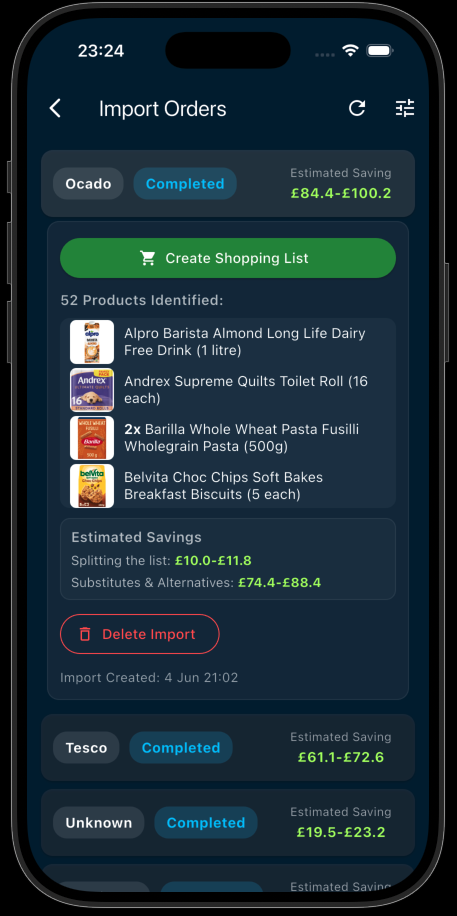
Shopsplit online grocery order import on iPhone

Forward your grocery confirmation email to import@orders.shopsplit.uk and your full order is imported automatically — no manual entry needed.

Shopsplit shows you where you could save, which items are cheaper elsewhere, and whether a split would help. If you act before your delivery window closes, you can realise the savings on this shop — not just the next one.

Currently supports Tesco, Ocado, Morrisons, and Waitrose.

How to forward your grocery order email →
190,000+ Product Catalogue

Browse and compare products from all major UK supermarkets — all in one place.
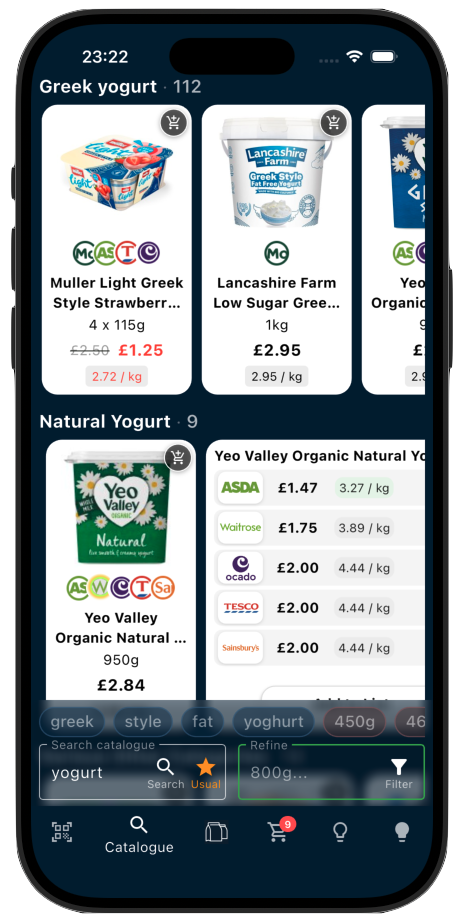
Shopsplit product catalogue on iPhone

Browse and search over 190,000 products from Tesco, Sainsbury’s, Asda, Morrisons, Aldi, Ocado, Waitrose and more — all in one unified catalogue.

The quickest way to find what you need is to search wide, then refine. Start with a broad term like “bread” and you’ll instantly see everything across all supermarkets. Then narrow it down — by brand, weight, type, or any other attribute. Type a search term or tap any of the filter pills — “Medium”, “Seeded”, “800g”, or whatever matters to you — and the results update immediately.

This is powered by the Refine Bar — a row of smart filter pills that appear below your search results and change dynamically as you drill down. The pills always reflect what’s relevant to what you’re looking at, so the more you tap, the more focused your results get. It’s the fastest way to find exactly the right product without scrolling through hundreds of options.

Once you find what you want, add it straight to your shopping list — then let Shopsplit compare prices and find the best place to buy it.

🖥️

Best on iPad. The catalogue takes full advantage of the larger screen — more products visible at once, side-by-side browsing, and a layout designed specifically for the iPad display.

Barcode & Product Scanner

Turn your phone into a barcode scanner and add products instantly while shopping in-store.
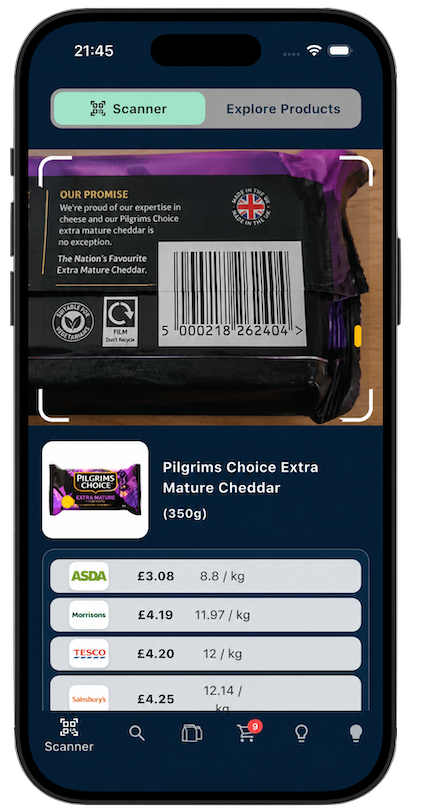
Shopsplit barcode scanner on iPhone

Scan any product barcode to instantly look it up across the Shopsplit catalogue. See the price at every supermarket, check for cheaper alternatives, and add it straight to your shopping list — all in one tap.

It’s also one of the fastest ways to build your shopping list from scratch — outside of importing an online grocery order, of course. Instead of searching the catalogue product by product, just open the scanner and work through your fridge, cupboards, or any items you need to restock. Much quicker than typing.

Useful for on-the-spot price checks too — if you’re already standing in a supermarket aisle and want to know if you’re getting a good deal before putting something in your basket.

ℹ️

A note on coverage. Shopsplit covers nearly 190,000 products, but some items — particularly local own-brand products and loose vegetables — may not be recognised. When this happens, the app will prompt you to register the supermarket where you found the unknown barcode. That helps us improve coverage over time, so the more people scan, the better it gets.

Shopping List & In-Store Mode

Keep one list — Shopsplit organises it by store and lets you tick off items as you go.
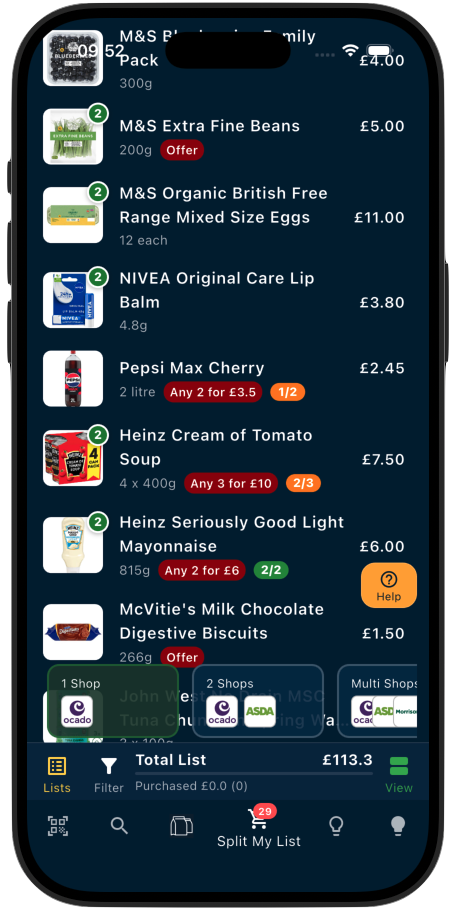
Shopsplit shopping list on iPhone

Your optimised shopping list stays live in the app while you shop — organised by store so you always know what to buy where. Tick off items as you go.

Share or email your list if you’re splitting the run between two people, or want a copy to refer to without your phone in hand.

You’re in Control

Set your preferences, filters, and favourites — so Shopsplit works the way you shop.

Filter by supermarket, set preferred brands, mark favourites, and tell Shopsplit which substitutes you’ll accept. The more you use it, the smarter it gets.

All settings are saved to your account so your preferences carry across sessions and devices.

Free vs Shopsplit Pro

Shopsplit is free to use. Pro unlocks higher limits and deeper insights.

Free
  • ✓ Full catalogue access
  • ✓ Price comparison across supermarkets
  • ✓ 5 Shopping lists up to 30 items
  • ✓ Top 3 savings shown per list
  • ✓ Barcode scanner
  • ✓ Order email import
  • ✓ Basket splitting
Shopsplit Pro ✦
  • ✓ Everything in Free
  • ✓ Unlimited Shopping Lists, Synced to Cloud
  • ✓ Shopping list up to 150 items
  • ✓ All savings shown — no limit
  • ✓ Enhanced insights and recommendations
  • ✓ Smarter personalised suggestions
  • ✓ Priority features as they launch

Download Shopsplit

Free to start. Available on iPhone and iPad. No credit card required.
Download on the App Store

© 2026 Shopsplit Ltd. All Rights Reserved. Privacy Policy
71-75 Shelton Street, Covent Garden, London, WC2H 9JQ, UK 🇬🇧