Shopsplit App Features: More Ways to Save on Groceries

On iPhone, iPad and Android, Shopsplit brings grocery price comparison, shopping lists and savings suggestions together. Explore the tools that help you spend less time checking prices and find ways to save—from smarter product searches to cheaper alternatives and basket splitting.


Free to start. No credit card required.
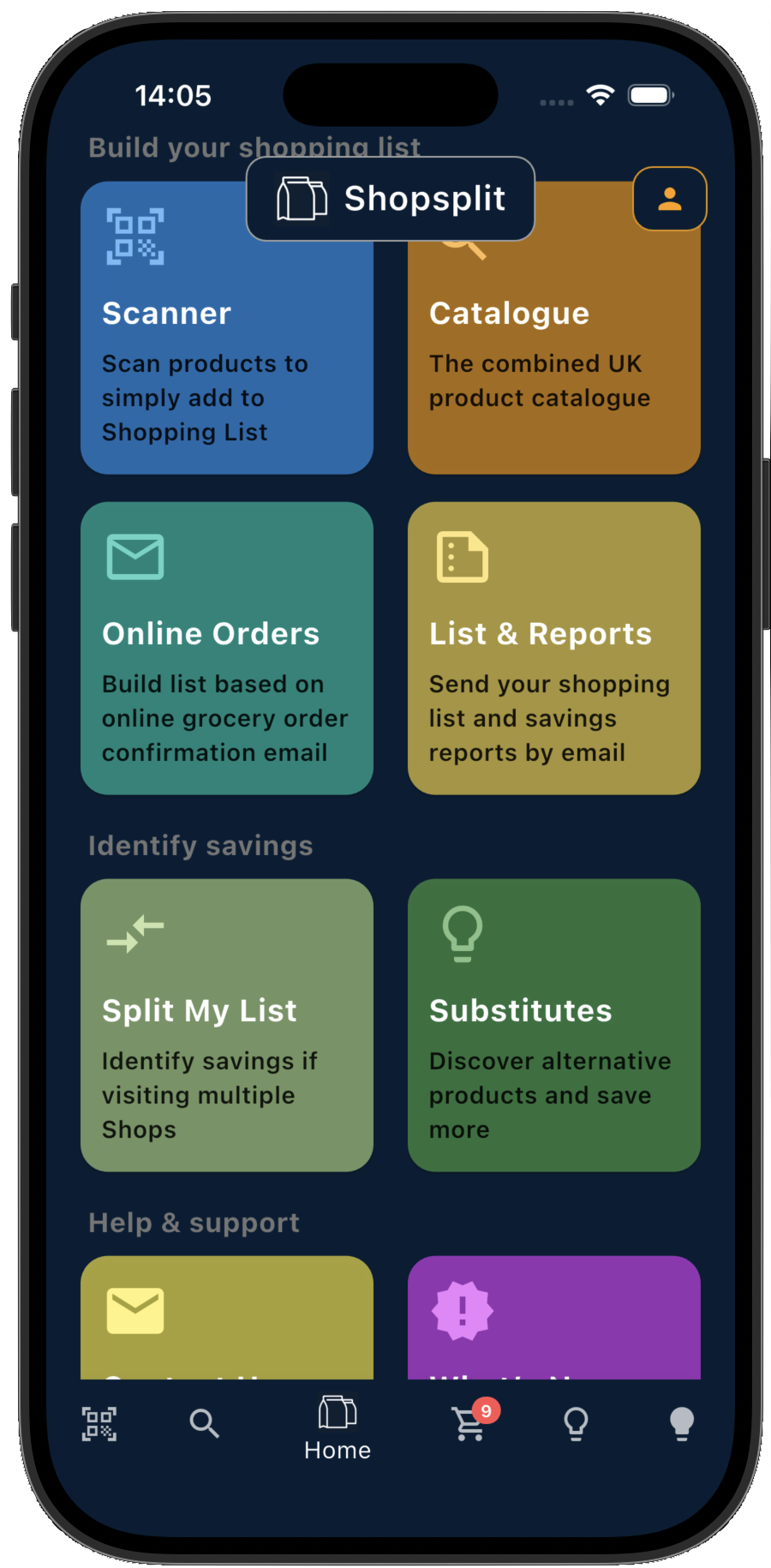
Shopsplit home screen on iPhone
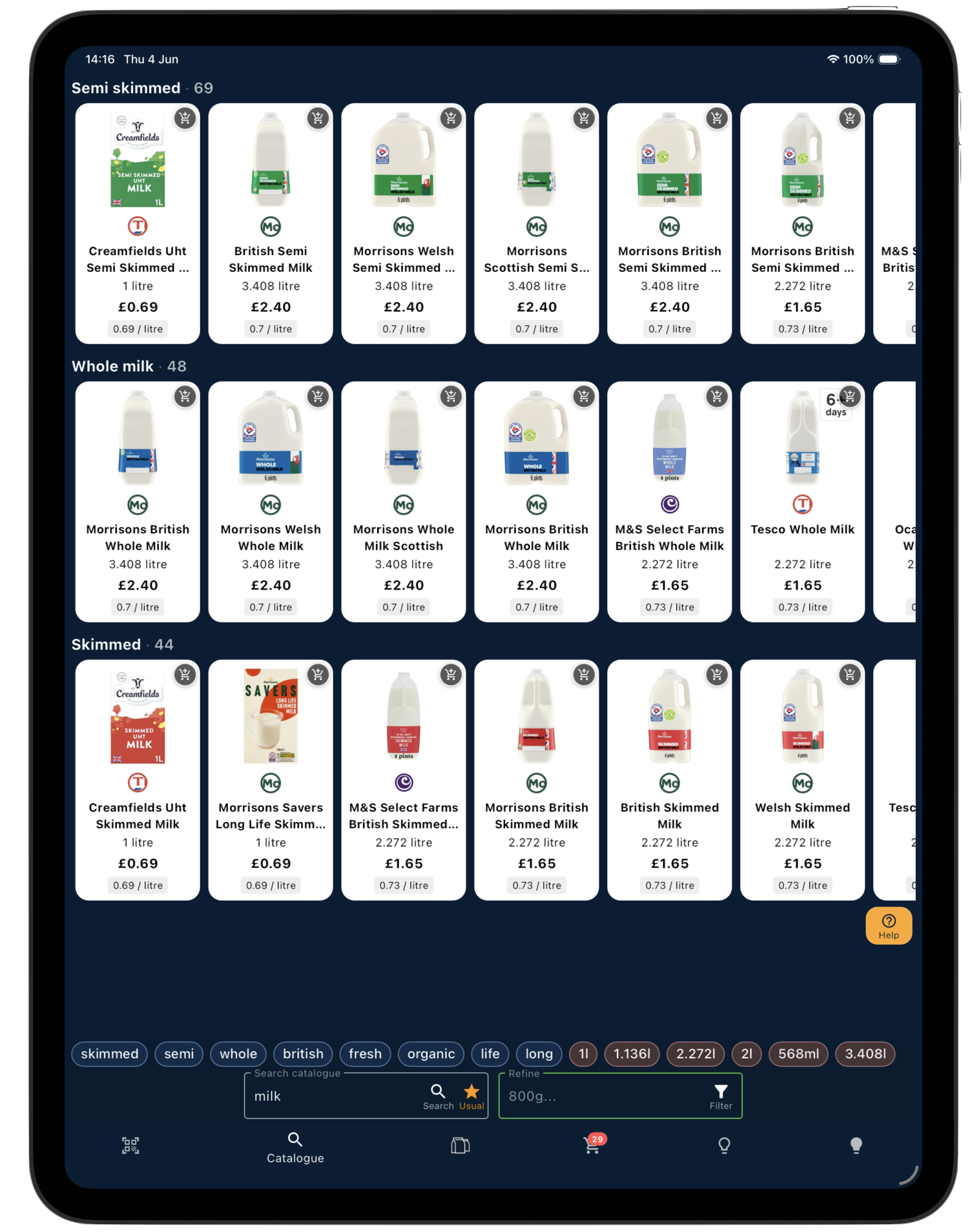
Shopsplit catalogue on iPad
Basket Splitting

Compare one-store and split-shop options to find ways to reduce your grocery bill.
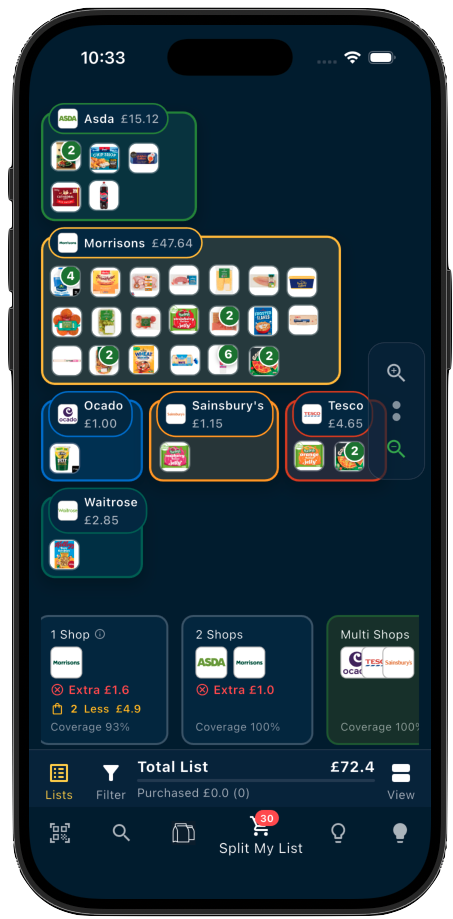
Shopsplit basket splitting across supermarkets on iPhone

Shopsplit compares your shopping list across supermarkets and shows how the total changes when you buy from one, two or more stores. A two-store split can capture much of the available saving; adding another store may save more, depending on your basket and current prices. Consider extra journeys, delivery charges and minimum spends when choosing what works for you.

You stay in control — and you can explore interactively. Change the number of shops, switch which supermarkets are included, and watch your products move dynamically from store to store as Shopsplit recalculates in real time. It’s easy to see exactly why each item ends up where it does.

The comparison includes the offers, multibuy promotions and loyalty prices captured in the catalogue, where applicable. Some prices require a loyalty card or a particular quantity. Check the supermarket’s current price and offer conditions before buying.

ℹ️

A note on promotions. We continue to expand coverage, but not every product or promotion is captured. Prices and availability can change, so the savings shown are a guide based on the data available.

How split shopping works →
AI Savings & Substitutes

Discover cheaper alternatives and substitutions — tailored to your shopping list.
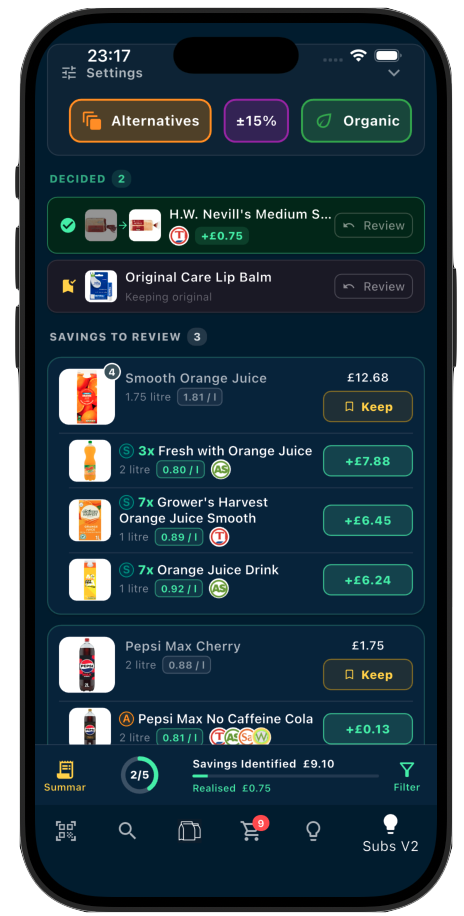
Shopsplit savings and substitutes screen on iPhone

As well as comparing prices for the same product, Shopsplit suggests lower-priced alternatives that may suit your shopping list. Review ingredients, pack sizes and your own preferences before accepting a swap. Substitutes can offer additional savings alongside changing stores.

Use the filters to focus on specific supermarkets — useful if you already know where you’re shopping and just want to find the best swaps within those stores.

For each suggestion you stay in control: accept the ones you’re happy with, keep the originals where you’re not. Once you’ve decided, Shopsplit updates your shopping list automatically with all the changes applied — ready to use, share, or email.

Suggestions are personalised over time. The more you use Shopsplit, the better it understands your preferences and filters out swaps you wouldn’t accept.

Import Grocery Orders

Forward a supported order email or receipt PDF and turn it into a shopping list for comparison.
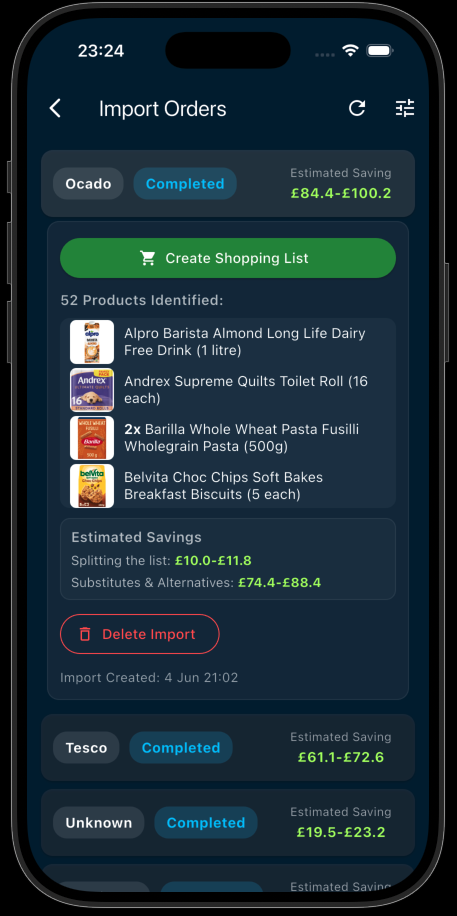
Shopsplit online grocery order import on iPhone

Forward your supported grocery confirmation email to import@orders.shopsplit.uk. Shopsplit matches the items to the catalogue and creates a shopping list within your account limits. You can review recognised or omitted items and add any missing products manually.

Shopsplit shows where products may be cheaper and whether a split could help. If your supermarket’s order-amendment deadline has not passed, you may still be able to adjust this order. Otherwise, use the comparison to help with your next shop.

Currently supports Tesco, Ocado, Morrisons, Waitrose, Sainsbury’s and Asda.

You can also forward supported Sainsbury’s and Ocado receipt PDFs as email attachments. Keep the original PDF attached: scanned images and PDFs without selectable text are not supported.

Track progress on the Online Orders screen, then open the completed import to review its list. You can manage import email and push notifications in Settings.

How to forward your grocery order email →
220,000+ Product Catalogue

Search 220,000+ grocery products across eight UK supermarkets and find what you need faster.
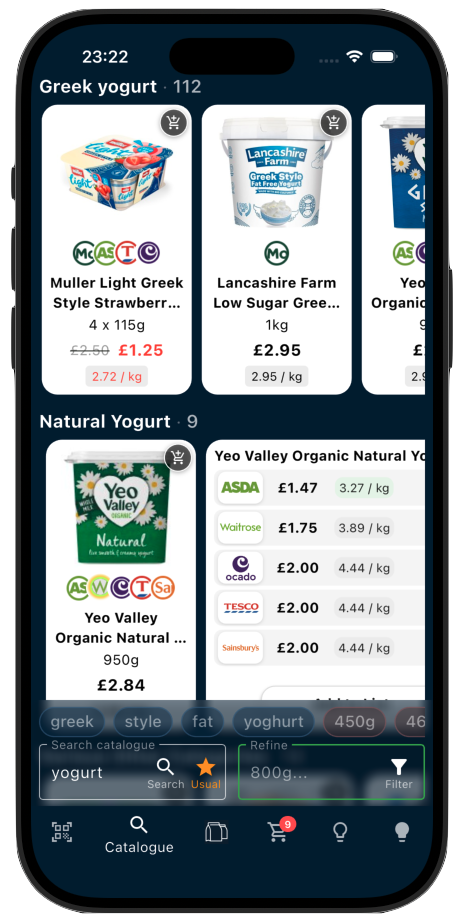
Shopsplit product catalogue on iPhone

Browse and search 220,000+ products from Tesco, Sainsbury’s, Asda, Morrisons, Aldi, Ocado, Waitrose and Co-op in one combined catalogue. Compare available prices without checking each supermarket separately.

Search the way you think about groceries: a product name, brand, quantity or pack size. Shopsplit’s smarter search can correct common typos and interpret those details to help you find the right products. You can also search wide, then refine: start with “bread”, then narrow the results with “seeded”, “800g” or a brand name.

The Refine Bar offers filter pills based on your results, so you can narrow by the details that matter without scrolling through every match. Use shop filters to focus on the supermarkets you want to compare.

Your usual products brings together items you use most often in saved lists. In Favourites view, recently scanned products also appear in their own row when available. Find a product, check its available supermarket prices and add it to your list — then let Shopsplit compare the basket for you.

🖥️

Best on iPad. The catalogue takes full advantage of the larger screen — more products visible at once, side-by-side browsing, and a layout designed specifically for the iPad display.

Barcode & Product Scanner

Scan a barcode to look up a product and add it to your list at home or in-store.
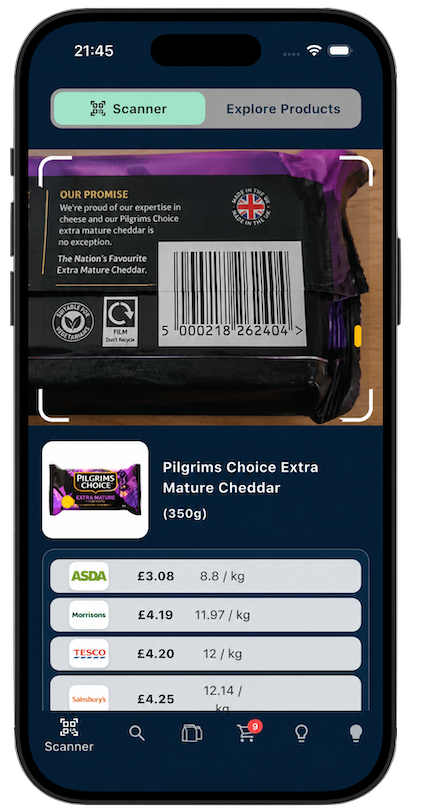
Shopsplit barcode scanner on iPhone

Scan a product barcode to look for it in the Shopsplit catalogue, review available supermarket prices and add it to your shopping list. After scanning, switch to Product Explorer to explore related items, such as different pack sizes or alternative products.

It’s also one of the fastest ways to build your shopping list from scratch — outside of importing an online grocery order, of course. Instead of searching the catalogue product by product, just open the scanner and work through your fridge, cupboards, or any items you need to restock. Much quicker than typing.

Useful for price checks while you shop, too. Catalogue prices may differ from local in-store prices, so check the shelf price before buying. Standard includes up to 50 scans per day; Pro includes unlimited scans.

ℹ️

A note on coverage. Shopsplit covers 220,000+ products, but some items — particularly local own-brand products and loose vegetables — may not be recognised. When this happens, the app will prompt you to register the supermarket where you found the unknown barcode. That helps us improve coverage over time, so the more people scan, the better it gets.

Shopping List & In-Store Mode

Keep one list — Shopsplit organises it by store and lets you tick off items as you go.
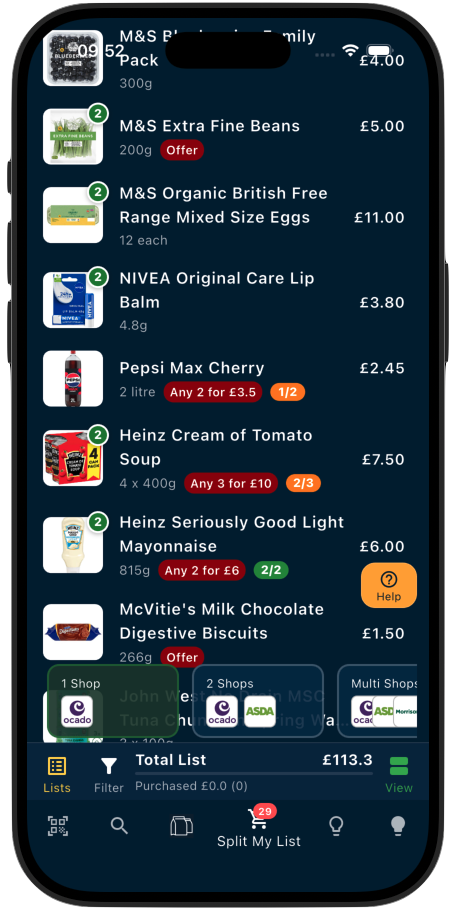
Shopsplit shopping list on iPhone

Use your shopping list in-store, organised by supermarket, and tick off items as you go. Previously loaded items remain available offline, so you can still refer to your list when reception is poor. Connect again to refresh prices and sync changes.

Email a copy of your shopping list or savings report if someone else is doing part of the shop, or you want a separate reference. Signed-in users can sync their own saved lists across devices; emailing a copy is separate from live collaborative editing.

You’re in Control

Set your preferences, filters, and favourites — so Shopsplit works the way you shop.

Filter by supermarket, set preferred brands, mark favourites, and tell Shopsplit which substitutes you’ll accept. The more you use it, the smarter it gets.

All settings are saved to your account so your preferences carry across sessions and devices.

Free vs Shopsplit Pro

Browse the catalogue without an account. Create a free Standard account to save your own shopping lists and sync them across devices. Pro unlocks higher limits and additional recommendations.

Standard — free account
  • ✓ Full catalogue access
  • ✓ Price comparison across supermarkets
  • ✓ Up to 5 saved lists, with 30 items each
  • ✓ Sync your own lists across devices
  • ✓ Recommendations for up to 10 products per saved list
  • ✓ Barcode scanner: up to 50 scans per day
  • ✓ Online order import within available trial limits
  • ✓ Basket splitting
Shopsplit Pro ✦
  • ✓ Everything in Free
  • ✓ Unlimited saved shopping lists
  • ✓ Up to 150 items per saved list
  • ✓ Unlimited barcode scans
  • ✓ Online grocery order import
  • ✓ Recommendations for all eligible products in your list
  • ✓ Enhanced insights and recommendations
  • ✓ Smarter personalised suggestions
  • ✓ Priority features as they launch

Download Shopsplit

Free to start. Available on iPhone, iPad, and Android. No credit card required.

© 2026 Shopsplit Ltd. All Rights Reserved. Privacy Policy
71-75 Shelton Street, Covent Garden, London, WC2H 9JQ, UK 🇬🇧